Artificial Intelligence · Class 10 · Practical File · Program 8 of 15
Computer VisionFrom the CBSE curriculum list⏱️ 6 min read
Program 8: Read an Image and Display It
Write a program to read an image and display it using Python.
Download
All 15 programs with output, in one PDF1Aim
Write a program to read an image and display it using Python.
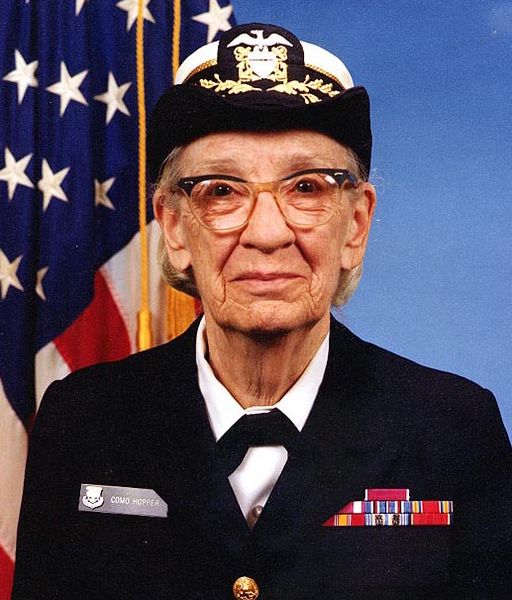
Keep photo.jpg in the same folder as the program.
2Program
read_image.py
# Program 8: Read an image and display it using Python
# photo.jpg must be in the same folder as this program.

import cv2
import matplotlib.pyplot as plt

image = cv2.imread("photo.jpg")

# OpenCV stores colours in the order Blue, Green, Red (BGR).
# Matplotlib expects Red, Green, Blue (RGB), so the order is swapped.
image_rgb = cv2.cvtColor(image, cv2.COLOR_BGR2RGB)

plt.figure(figsize=(8, 4.5))
plt.subplot(1, 2, 1)
plt.imshow(image)
plt.title("Shown as BGR (colours wrong)")
plt.axis("off")
plt.subplot(1, 2, 2)
plt.imshow(image_rgb)
plt.title("Converted to RGB (correct)")
plt.axis("off")
plt.show()

print("Image read successfully")3Output
The output of a real run, exactly as it appeared.
Output
Image read successfully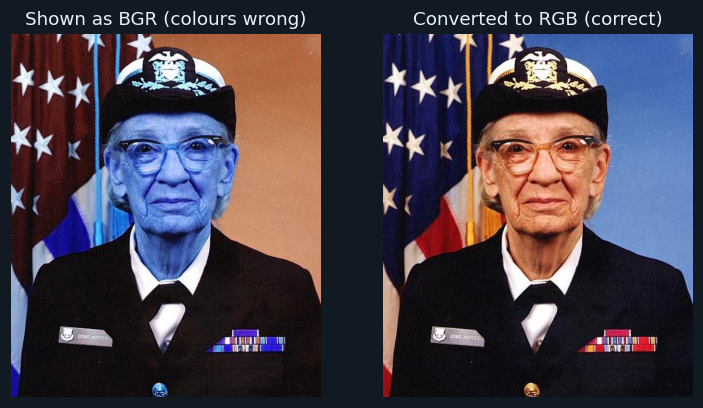
the window opened by plt.show()
4How it works
import cv2cv2 is OpenCV, the computer vision library the handbook names in Unit 5.
cv2.imread("photo.jpg")Reads the image into an array of numbers. If the file is not found, it returns None — check the file name and folder.
cv2.cvtColor(image, cv2.COLOR_BGR2RGB)OpenCV keeps colours in the order Blue, Green, Red. Matplotlib expects Red, Green, Blue, so the order is swapped before showing.
plt.imshow(...) and plt.axis("off")Shows the image and hides the axis numbers.
Note
photo.jpg is the well-known public-domain photograph of Grace Hopper, a computer scientist, that ships with Matplotlib as sample data.
5Try this
- Read a photo of your own.
- Show the image in grayscale with cv2.imread("photo.jpg", 0) and cmap="gray".
- Use cv2.imwrite("copy.jpg", image) to save a copy.
6Viva questions
▸Which function reads an image in OpenCV?
cv2.imread().
▸Why do the colours look wrong without cvtColor?
OpenCV stores colours as BGR, but Matplotlib displays them as RGB, so red and blue get swapped.
▸What does cv2.imread() return if the file is missing?
None.
Tip
In your practical file, write the aim, the program and the output for each program — run it yourself and copy your own output. See The Practical File for how to set the file out.