What Do Passengers Feel?
The curriculum's own NLP project: sentiment analysis of feedback on city buses — and why "no complaints" fools a list of words but not a model that learns.
1Introduction
City bus services ask passengers for feedback, and passengers write it — on a website, an app, a WhatsApp number. Hundreds of messages arrive every week.
Somebody has to read them all to find the complaints that need action: a rude driver, a bus that skips a stop, a broken door. In practice nobody has the time, so complaints sit unread, and passengers stop writing.
Sentiment analysis is the sample NLP project in the CBSE curriculum. This version reads bus feedback and decides whether each message is positive or negative, so that the negative ones can go straight to the complaints desk.
Sustainable Cities and Communities
SDG target 11.2 asks for safe, affordable and accessible public transport for everyone. Buses only get better if the people running them hear what passengers say. A feedback form nobody reads changes nothing; a system that sorts the complaints from the praise, so the complaints reach someone quickly, does.
The curriculum asks that the project be related to the Sustainable Development Goals. That link is the reason the problem is worth solving, so it belongs at the very start of the report, not tacked on at the end.
2Stage 1 — Problem Scoping
Problem scoping means understanding the problem properly before building anything. The tool for it is the 4Ws Problem Canvas: who has the problem, what the problem is, where it happens, and why solving it matters.
- The city transport office
- Passengers who use the buses every day
- Hundreds of feedback messages, too many to read
- Complaints are not noticed, so problems are not fixed
- A city bus service with an online feedback form
- Every day, as messages arrive
- Complaints reach the right person quickly
- Passengers see their feedback makes a difference, and keep using the buses
The problem statement
The four answers are then joined into one sentence, using the curriculum's problem statement template:
A city transport office receiving hundreds of feedback messages a week, and the passengers who write them.
How it is done today
Accurate, but takes hours every week, so in practice it does not happen.
Quick to count, but a star rating does not say what went wrong, and many people write without giving one.
Searching for words like "late" or "rude". Better than nothing, but "never late" contains "late" — this project shows how often that kind of mistake happens.
Objectives
- To read passenger feedback from a CSV file
- To remove repeated and empty messages
- To normalise the text: common case, letters only, tokens, stop words removed, words stemmed
- To build a Bag of Words and find the most common words in positive and negative messages
- To compare a lexicon (word lists written by a person) with word scores learned from the data
- To send new negative messages to the complaints desk
📘 Revise: Stage 1 — Problem Scoping
3Stage 2 — Data Acquisition
Each row is one message from the feedback form: an ID, the message as the passenger typed it, and whether it is positive or negative. The label was decided by a person reading each message.
The file has 422 rows.
The messages were put together by a program from phrases a passenger might write — mixed case, route numbers, punctuation and emoticons included — so that no real passenger's words are used. For your own project, collect feedback about your school canteen or transport with a short anonymous form, label each response yourself, and credit any public dataset you use instead.
Features and label
The features are what the model is given. The label is the answer it has to learn to give.
| Column | Type | What it holds | Role |
|---|---|---|---|
message | text | What the passenger wrote — turned into tokens, then a Bag of Words | feature |
sentiment | text | positive or negative — what the model must predict | label |
feedback_id | text | An ID for the form — no names | not used |
The first six rows of bus_feedback.csv
| feedback_id | message | sentiment |
|---|---|---|
F7180 | TODAY THE AC WAS NOT WORKING ALSO NOBODY ANSWERED THE HELPLINE. | negative
|
F7273 | The new buses are great also the bus was late again and the bus was clean | positive
|
F7244 | TODAY THE BUS BROKE DOWN | negative
|
F7343 | No complaints at all but the staff were friendly | positive
|
F7074 | ROUTE 45: THE CONDUCTOR SHOUTED AT AN OLD MAN. THE DRIVER USED HIS PHONE AND THE SEATS WERE DIRTY | negative
|
F7343 | No complaints at all but the staff were friendly | positive
|
Inside bus_feedback.csv
Passenger feedback with a positive or negative label. One form was submitted twice and one was sent empty. The whole file is 422 rows, 34.6 KB. It comes with the project download, and you can take the file on its own.
📘 Revise: Stage 2 — Data Acquisition
4Stage 3 — Data Exploration
Data exploration means getting to know the data before trusting it: fixing what is wrong with it, then drawing it to see the patterns. The charts here are what decide what the model should be.
What was wrong with the data
drop_duplicates() removes a row whose ID and message are both repeated. Two different passengers can write the same words, so a repeated message with a different ID is kept.
Removed — there is nothing to analyse.
Text normalisation: everything is changed to lower case, and anything that is not a letter becomes a space. "RUDE", "Rude" and "rude!" all become the token rude.
Stop words are removed. But not and never are deliberately kept: "not clean" means the opposite of "clean".
A simple stemmer cuts the endings -ing, -ed and -s from longer words, so all three become wait. Like real stemming, it sometimes makes non-words — skipped becomes skipp — which is fine, as long as it is done the same way every time.
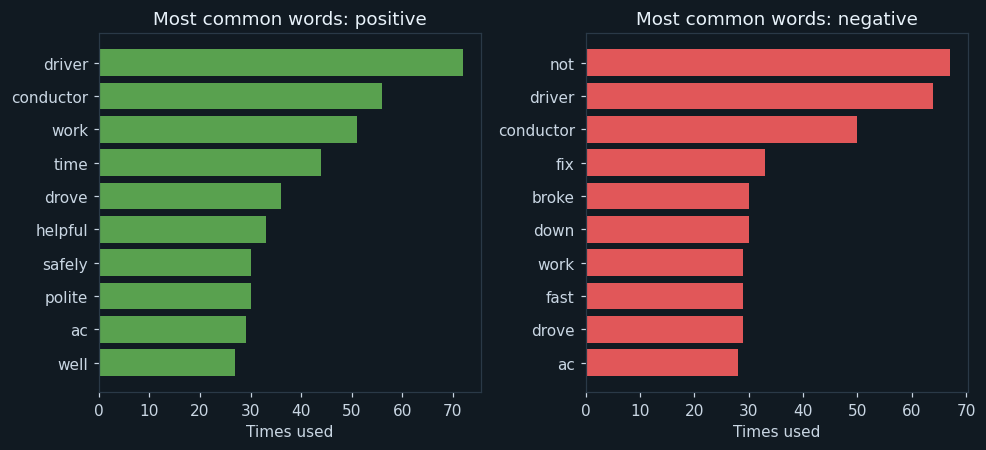
After normalisation, the ten tokens used most often in positive messages (left) and in negative messages (right).
Some words are near the top of both lists — driver, conductor, work, drove and ac — because people praise and complain about the same things. Those words alone cannot say which way a message leans. The useful words are the ones on one side only: helpful, safely and polite on the left; not, fix, broke and fast on the right. Notice that not is the most common word in complaints, which is why it must never be thrown away as a stop word.
📘 Revise: Stage 3 — Data Exploration
5Stage 4 — Modelling
Where this model sits in the family of AI models:
The answer is positive or negative, so this is classification. Each training message has a label written by a person, so it is supervised learning. The input is text, so it is Natural Language Processing.
How the model works
The messages are split into 336 for training and 84 for testing.
Model A, the lexicon, is rule based. A person wrote a list of good words (polite, clean, smooth...) and bad words (late, rude, crowd...). A message scores +1 for each good word and −1 for each bad word, and is positive if the total is 0 or more. This is how the Sentiment Analysis widget in Orange works, with much longer lists.
Model B is learning based. For every word, it counts how often the word appears in positive and in negative training messages, and gives it a score from −1 to +1. A new message's score is the total of its words' scores. Nobody writes a list: the data decides which words matter, and how much.
📘 Revise: Stage 4 — Modelling
6Stage 5 — Evaluation
Both models were tested on the same 84 messages. The lexicon's accuracy was 85.7 %; the learned scores reached 96.4 %.
For a transport office the key number is how many complaints are caught, because a missed complaint is a problem nobody fixes. That is the recall for negative messages: 82.2 % for the lexicon against 95.6 % for the learned scores.
The program prints some messages the lexicon got wrong, and they show why. "It was not crowded" contains crowd, so the list calls it negative. "The driver used his phone, nobody answered the helpline" contains no word on either list, so it scores 0 and is called positive. Word lists cannot handle words they were not given, or words that change meaning beside not and never. Learning from the data handles many of these cases — though not all, because a Bag of Words still looks at words one at a time.
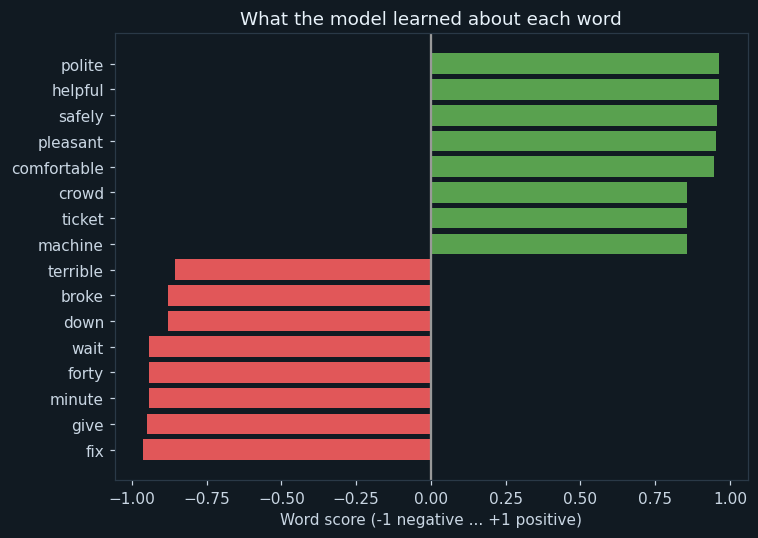
The learned score of the most negative and most positive words, from −1 (only ever in complaints) to +1 (only ever in praise).
The model found its own word lists from the training messages. Some are obvious — polite, helpful, pleasant are positive. Others are things a person writing a list would not think of: "fix" (from "please fix this") is one of the strongest signs of a complaint.
One is surprising: crowd is learned as positive. In this data it only appears in "not crowded" — complaints say "overcrowded", which stems to a different word. A person's word list calls crowd bad; the data says otherwise.
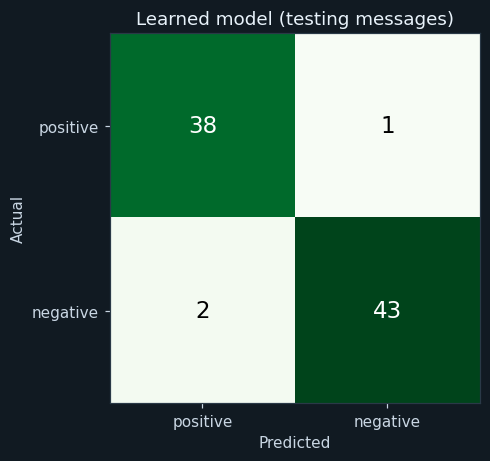
Rows are the real sentiment, columns what the learned model said. The diagonal holds correct answers.
Almost everything is on the diagonal. The few mistakes are messages that mix praise and complaint, where even a person might hesitate.
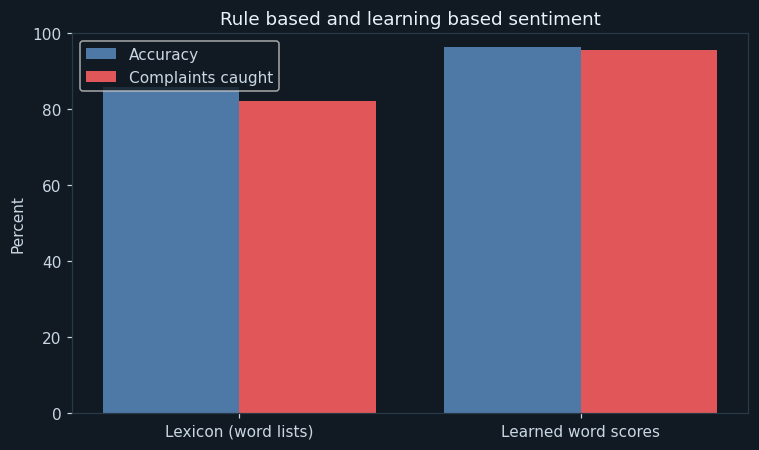
For each model: its accuracy, and the share of negative messages it caught.
The lexicon reached 85.7 % and caught 82.2 % of complaints. The learned scores reached 96.4 % and caught 95.6 %.
📘 Revise: The Confusion Matrix
7Stage 6 — Deployment
The program scores four new messages. Negative ones are marked "send to the complaints desk". Notice the first: "never late... driver very polite". The lexicon would count late as bad and polite as good, reach 0, and call it positive only because a tie counts as positive. The learned model gives it a clearly positive score.
In real use the program would run each time a message arrives. Complaints would go to a person straight away, and once a week the office would see a count of complaints by route.
📘 Revise: Stage 6 — Deployment
8Ethical concerns
An AI project is not finished when the model works. The curriculum asks three questions of every model — is it fair (bias), can it explain itself (transparency), and who answers for its mistakes (accountability). For this project:
Feedback can contain names, phone numbers or route details that identify a person. Messages should be stored without personal details, and used only to improve the service.
The model learned from English messages written in one style. Feedback in Hindi or another language, or in Hinglish, would be scored on the few words it recognises — so those passengers' complaints might be missed. A fair system must work for everyone who uses the buses.
Every word's score can be shown, so anyone can see why a message was sorted the way it was. The model only sorts; a person reads each complaint and decides what to do.
📘 Revise: Bias, Transparency, Accountability
9Source code
The whole program — it is also in the downloads at the top of this page — in Python with pandas, NumPy and matplotlib — the three libraries of Unit 7. It is laid out as the six stages of the AI Project Cycle, one after another. Every chart on this page was drawn by it, and every number came out of running it.
# ---------------------------------------------------------------------------
# bus_feedback.py
#
# AI project on Natural Language Processing: sentiment analysis of feedback
# that passengers send about a city's buses - is each message positive or
# negative?
#
# CBSE Class X, Artificial Intelligence (417), Part C project work.
# SDG 11 (Sustainable Cities and Communities - target 11.2, transport).
#
# The steps are the ones Unit 6 teaches:
#   1. Text normalisation - lower case, remove punctuation and numbers,
#      split into tokens, remove stop words, and stem each word
#   2. Bag of Words - count the words in each message
#   3. A model that decides the sentiment from those words
#
# Two models are compared:
#   - LEXICON (rule based): two lists of words written by a person - good
#     words and bad words. This is how Orange's Sentiment Analysis widget works.
#   - LEARNED WORD SCORES (learning based): from the training messages, the
#     program works out how positive or negative each word tends to be.
#
# Libraries: pandas (the messages), matplotlib (charts), numpy.
# ---------------------------------------------------------------------------

# %% Stage 1 - Problem scoping
print("=" * 60)
print("WHAT DO PASSENGERS FEEL?")
print("=" * 60)
print("Who   : the city transport office, and daily bus passengers")
print("What  : hundreds of feedback messages a week, read by nobody")
print("Where : a city bus service with an online feedback form")
print("Why   : complaints read quickly get fixed quickly")
print()

# %% Stage 2 - Data acquisition
import pandas as pd
import numpy as np
import matplotlib.pyplot as plt

pd.set_option("display.width", 140)
pd.set_option("display.max_colwidth", 90)

data = pd.read_csv("bus_feedback.csv")

print("--- Stage 2: Data acquisition ---")
print("Messages read :", len(data))
print()
print("The first 5 messages:")
print(data.head(5).to_string(index=False))
print()

# %% Stage 3 - Data exploration
print("--- Stage 3: Data exploration ---")

before = len(data)
# The same form submitted twice has the same ID and the same message. Two
# different passengers may write the same words - those are both kept.
data = data.drop_duplicates()
print("Messages sent twice           :", before - len(data), "(removed)")
empty = data["message"].isnull().sum()
data = data.dropna(subset=["message"])
print("Empty forms                   :", empty, "(removed)")
print("Messages left                 :", len(data))
print(data["sentiment"].value_counts().to_string())
print()

# Stop words: very common words that carry no feeling on their own.
# "not" and "never" are NOT on the list - they change the meaning.
stop_words = ["the", "a", "an", "and", "was", "were", "is", "are", "it", "to", "at",
              "of", "for", "our", "we", "i", "his", "this", "today", "also", "but",
              "very", "too", "again", "all", "every", "route", "bus", "trip",
              "morning", "evening", "please", "thanks", "an", "did", "on"]

# Text normalisation, one message at a time.
tokens_list = []
for text in data["message"]:
    text = text.lower()                                  # 1. common case
    clean = ""
    for ch in text:                                      # 2. keep letters only
        if ch.isalpha():
            clean = clean + ch
        else:
            clean = clean + " "
    tokens = []
    for word in clean.split():                           # 3. tokenise
        if word in stop_words:                           # 4. remove stop words
            continue
        for ending in ["ing", "ed", "s"]:                # 5. stem: cut endings
            if word.endswith(ending) and len(word) > 4:
                word = word[: -len(ending)]
                break
        tokens.append(word)
    tokens_list.append(tokens)
data["tokens"] = tokens_list

example = data.iloc[0]
print("Text normalisation of one message:")
print("  Original :", example["message"])
print("  Tokens   :", example["tokens"])
print()

# Bag of Words for the first three messages, on a few words.
vocabulary = []
for tokens in data["tokens"]:
    for word in tokens:
        if word not in vocabulary:
            vocabulary.append(word)
print("Words in the vocabulary :", len(vocabulary))
print()
show = ["driver", "polite", "rude", "late", "clean", "not", "never"]
bow = pd.DataFrame(0, index=["msg 1", "msg 2", "msg 3"], columns=show)
for m in range(3):
    for word in data.iloc[m]["tokens"]:
        if word in show:
            bow.loc["msg " + str(m + 1), word] = bow.loc["msg " + str(m + 1), word] + 1
print("Bag of Words (part of it) for the first three messages:")
print(bow)
print()

# Chart 1: the most common words in positive and in negative messages.
plt.figure(figsize=(9, 4.2))
for k, feeling in enumerate(["positive", "negative"]):
    counts = {}
    for tokens in data[data["sentiment"] == feeling]["tokens"]:
        for word in tokens:
            counts[word] = counts.get(word, 0) + 1
    top = pd.Series(counts).sort_values(ascending=False).head(10)
    plt.subplot(1, 2, k + 1)
    plt.barh(top.index[::-1], top.values[::-1], color=["#59a14f", "#e15759"][k])
    plt.title("Most common words: " + feeling)
    plt.xlabel("Times used")
plt.tight_layout()
plt.savefig("chart1_common_words.png")
plt.close()

# %% Stage 4 - Modelling
print("--- Stage 4: Modelling ---")
data = data.sample(frac=1, random_state=12)
cut = int(len(data) * 0.8)
train = data[:cut]
test = data[cut:]
print("Training messages :", len(train))
print("Testing messages  :", len(test))
print()

# Model A - LEXICON. Two lists written by a person (in stemmed form).
good_words = ["polite", "helpful", "clean", "comfortable", "smooth", "friendly", "great",
              "safely", "pleasant", "properly", "right"]
bad_words = ["late", "rude", "overcrowd", "crowd", "dirty", "broken", "uncomfortable",
             "terrible", "fast", "skipp", "shout", "wait", "complaint", "broke"]

# Model B - LEARNED WORD SCORES. For every word: how much more often it
# appears in positive training messages than in negative ones, on a scale
# from -1 (only ever negative) to +1 (only ever positive).
pos_count = {}
neg_count = {}
for i in range(len(train)):
    for word in train.iloc[i]["tokens"]:
        if train.iloc[i]["sentiment"] == "positive":
            pos_count[word] = pos_count.get(word, 0) + 1
        else:
            neg_count[word] = neg_count.get(word, 0) + 1
score = {}
for word in vocabulary:
    p = pos_count.get(word, 0)
    n = neg_count.get(word, 0)
    score[word] = (p - n) / (p + n + 1)

scores = pd.Series(score).sort_values()
print("Most negative words learned :", list(scores.index[:6]))
print("Most positive words learned :", list(scores.index[-6:][::-1]))
for word in ["not", "never", "complaint", "late"]:
    print("Learned score for '" + word + "'".ljust(12 - len(word)), ":", round(score.get(word, 0), 2))
print()

# Chart 2: the learned word scores.
pick = pd.concat([scores.head(8), scores.tail(8)])
plt.figure(figsize=(7, 5))
colours = []
for v in pick.values:
    if v > 0:
        colours.append("#59a14f")
    else:
        colours.append("#e15759")
plt.barh(pick.index, pick.values, color=colours)
plt.axvline(0, color="#999999")
plt.title("What the model learned about each word")
plt.xlabel("Word score (-1 negative ... +1 positive)")
plt.tight_layout()
plt.savefig("chart2_word_scores.png")
plt.close()

lexicon = []
learned = []
for tokens in test["tokens"]:
    total_a = 0
    total_b = 0
    for word in tokens:
        if word in good_words:
            total_a = total_a + 1
        if word in bad_words:
            total_a = total_a - 1
        total_b = total_b + score.get(word, 0)     # a word never seen scores 0
    if total_a >= 0:
        lexicon.append("positive")
    else:
        lexicon.append("negative")
    if total_b >= 0:
        learned.append("positive")
    else:
        learned.append("negative")

# %% Stage 5 - Evaluation
print("--- Stage 5: Evaluation ---")
actual = list(test["sentiment"])
results = []
for name, predicted in [["Lexicon", lexicon], ["Learned", learned]]:
    right = 0
    caught = 0
    negatives = 0
    for i in range(len(actual)):
        if predicted[i] == actual[i]:
            right = right + 1
        if actual[i] == "negative":
            negatives = negatives + 1
            if predicted[i] == "negative":
                caught = caught + 1
    results.append([name, right / len(actual) * 100, caught / negatives * 100])
    print(name.ljust(8), "accuracy                 :", round(right / len(actual) * 100, 1), "%")
    print(name.ljust(8), "complaints caught (recall):", round(caught / negatives * 100, 1), "%")
print()

# Messages the lexicon got wrong but the learned model got right.
print("Where the word lists went wrong:")
shown = 0
for i in range(len(actual)):
    if lexicon[i] != actual[i] and learned[i] == actual[i] and shown < 4:
        print("  [" + actual[i] + "]", test.iloc[i]["message"])
        shown = shown + 1
print()

matrix = pd.crosstab(pd.Series(actual, name="Actual"), pd.Series(learned, name="Predicted"))
matrix = matrix.reindex(index=["positive", "negative"], columns=["positive", "negative"], fill_value=0)
print("Confusion matrix of the learned model:")
print(matrix)
print()

# Chart 3: confusion matrix.
plt.figure(figsize=(5, 4.3))
plt.imshow(matrix.values, cmap="Greens")
for r in range(2):
    for c in range(2):
        value = matrix.values[r][c]
        if value > matrix.values.max() / 2:
            ink = "white"
        else:
            ink = "black"
        plt.text(c, r, value, ha="center", va="center", fontsize=15, color=ink)
plt.xticks([0, 1], ["positive", "negative"])
plt.yticks([0, 1], ["positive", "negative"])
plt.xlabel("Predicted")
plt.ylabel("Actual")
plt.title("Learned model (testing messages)")
plt.tight_layout()
plt.savefig("chart3_matrix.png")
plt.close()

# Chart 4: the two models compared.
x = np.arange(2)
plt.figure(figsize=(7, 4.2))
plt.bar(x - 0.2, [results[0][1], results[1][1]], width=0.4, label="Accuracy", color="#4e79a7")
plt.bar(x + 0.2, [results[0][2], results[1][2]], width=0.4, label="Complaints caught", color="#e15759")
plt.xticks(x, ["Lexicon (word lists)", "Learned word scores"])
plt.ylim(0, 100)
plt.ylabel("Percent")
plt.title("Rule based and learning based sentiment")
plt.legend()
plt.tight_layout()
plt.savefig("chart4_models.png")
plt.close()

# %% Stage 6 - Deployment
print("--- Stage 6: Deployment ---")
new_messages = [
    "Bus 45 was never late this week, driver very polite!",
    "Waited 30 minutes and the bus was not clean.",
    "No complaints at all, smooth ride :)",
    "The conductor shouted at students. Terrible.",
]
for text in new_messages:
    clean = ""
    for ch in text.lower():
        if ch.isalpha():
            clean = clean + ch
        else:
            clean = clean + " "
    total = 0
    for word in clean.split():
        if word in stop_words:
            continue
        for ending in ["ing", "ed", "s"]:
            if word.endswith(ending) and len(word) > 4:
                word = word[: -len(ending)]
                break
        total = total + score.get(word, 0)
    if total >= 0:
        feeling = "POSITIVE"
    else:
        feeling = "NEGATIVE - send to the complaints desk"
    print(text.ljust(52), "score", str(round(total, 2)).rjust(6), "->", feeling)
The library calls it is built from
| Call | Where | What it does |
|---|---|---|
pd.read_csv() | Stage 2 | Reads the messages |
drop_duplicates() / dropna() | Stage 3 | Removes repeated and empty forms |
text.lower() | Stage 3 | Converts to a common case |
ch.isalpha() | Stage 3 | Keeps letters only, removing punctuation and numbers |
clean.split() | Stage 3 | Tokenises: splits the text into words |
if word in stop_words | Stage 3 | Removes stop words |
word.endswith(...) / word[:-n] | Stage 3 | The simple stemmer |
counts[word] = counts.get(word, 0) + 1 | Stages 3, 4 | Counts words — the Bag of Words |
(p - n) / (p + n + 1) | Stage 4 | A word's learned score |
plt.barh / plt.imshow / plt.bar | Stages 3, 5 | The charts |
10Sample output
A real run, exactly as it appeared. Nothing below was typed by hand.
============================================================
WHAT DO PASSENGERS FEEL?
============================================================
Who   : the city transport office, and daily bus passengers
What  : hundreds of feedback messages a week, read by nobody
Where : a city bus service with an online feedback form
Why   : complaints read quickly get fixed quickly

--- Stage 2: Data acquisition ---
Messages read : 422

The first 5 messages:
feedback_id                                                                                           message sentiment
      F7180                                   TODAY THE AC WAS NOT WORKING ALSO NOBODY ANSWERED THE HELPLINE.  negative
      F7273                         The new buses are great also the bus was late again and the bus was clean  positive
      F7244                                                                          TODAY THE BUS BROKE DOWN  negative
      F7343                                                  No complaints at all but the staff were friendly  positive
      F7074 ROUTE 45: THE CONDUCTOR SHOUTED AT AN OLD MAN. THE DRIVER USED HIS PHONE AND THE SEATS WERE DIRTY  negative

--- Stage 3: Data exploration ---
Messages sent twice           : 1 (removed)
Empty forms                   : 1 (removed)
Messages left                 : 420
sentiment
negative    210
positive    210

Text normalisation of one message:
  Original : TODAY THE AC WAS NOT WORKING ALSO NOBODY ANSWERED THE HELPLINE.
  Tokens   : ['ac', 'not', 'work', 'nobody', 'answer', 'helpline']

Words in the vocabulary : 63

Bag of Words (part of it) for the first three messages:
       driver  polite  rude  late  clean  not  never
msg 1       0       0     0     0      0    1      0
msg 2       0       0     0     1      1    0      0
msg 3       0       0     0     0      0    0      0

--- Stage 4: Modelling ---
Training messages : 336
Testing messages  : 84

Most negative words learned : ['fix', 'give', 'minute', 'forty', 'wait', 'down']
Most positive words learned : ['polite', 'helpful', 'safely', 'pleasant', 'comfortable', 'crowd']
Learned score for 'not'         : -0.41
Learned score for 'never'       : -0.09
Learned score for 'complaint'   : 0.72
Learned score for 'late'        : -0.07

--- Stage 5: Evaluation ---
Lexicon  accuracy                 : 85.7 %
Lexicon  complaints caught (recall): 82.2 %
Learned  accuracy                 : 96.4 %
Learned  complaints caught (recall): 95.6 %

Where the word lists went wrong:
  [positive] Bus 12 - it was not crowded, the ticket machine worked
  [positive] BUS 12 - I REACHED SCHOOL ON TIME ALSO THE BUS STOPPED PROPERLY AT EVERY STOP. IT WAS A TERRIBLE JOURNEY, IT WAS NOT CROWDED!
  [negative] The conductor did not give change. Please fix this
  [negative] The driver used his phone. nobody answered the helpline.

Confusion matrix of the learned model:
Predicted  positive  negative
Actual
positive         38         1
negative          2        43

--- Stage 6: Deployment ---
Bus 45 was never late this week, driver very polite! score   0.95 -> POSITIVE
Waited 30 minutes and the bus was not clean.         score  -2.29 -> NEGATIVE - send to the complaints desk
No complaints at all, smooth ride :)                 score   2.97 -> POSITIVE
The conductor shouted at students. Terrible. score -1.46 -> NEGATIVE - send to the complaints desk11The same project without code
The curriculum's NLP use case walkthrough is done in Orange. Its Sentiment Analysis widget is a lexicon, like model A; its Bag of Words with a model is like model B. The tool is Orange Data Mining (with the Text add-on).
Load bus_feedback.csv. Use message as the text feature and sentiment as the target.
Lowercase, remove punctuation and numbers, tokenise, filter stop words, and normalise words (Porter stemmer). Keep not and never.
See the most common words — the same idea as chart 1.
Try the Liu Hu or VADER lexicon. This is model A.
Turn each message into word counts.
Learn from the word counts — model B — and compare its accuracy with the lexicon.
Read the messages it got wrong.
📘 Revise: No-Code AI, and Orange
12Testing
Every case below was actually run, and the result is what came back. Each one gives the whole program a small input of its own.
| Test case | Expected | Actual | Result |
|---|---|---|---|
| All messages are read | Messages read : 422 | Messages read : 422 | Pass |
| A form submitted twice (same ID, same words) is removed once | Messages sent twice : 1 (removed) | Messages sent twice : 1 (removed) | Pass |
| An empty form is removed | Empty forms : 1 (removed) | Empty forms : 1 (removed) | Pass |
| Learned word scores beat the word lists | Learned accuracy : 96.4 % | Learned accuracy : 96.4 % | Pass |
| "No complaints" is learned as a good sign, though "complaint" sounds bad | Learned score for 'complaint' : 0.72 | Learned score for 'complaint' : 0.72 | Pass |
| Clear praise against clear complaints: no mistakes | Learned accuracy : 100.0 % | Learned accuracy : 100.0 % | Pass |
| Same words from a different passenger (new ID) are kept | Messages sent twice : 0 (removed) | Messages sent twice : 0 (removed) | Pass |
| A message of only numbers and punctuation becomes zero tokens and does not crash | Messages left : 41 | Messages left : 41 | Pass |
| The data file is missing | FileNotFoundError: [Errno 2] No such file or directory: 'bus_feedback.csv' | FileNotFoundError: [Errno 2] No such file or directory: 'bus_feedback.csv' | Pass |
13Results, limits and what next
- After normalisation, the whole set of messages uses only 63 different words.
- The learned word scores reached 96.4 %, against 85.7 % for the word lists.
- They caught 95.6 % of complaints, against 82.2 %.
- "Complaint" sounds negative but is learned as positive, because people write "no complaints".
- The word lists fail on words they do not contain, and on words turned around by not and never.
What this model cannot do
- Made-up messages, simpler and more regular than real ones
- English only
- A Bag of Words ignores word order: "not good" and "good, not bad" are hard for it
- It says whether a message is negative, not what the complaint is about
What to add next
This is where you make the project your own. Take one of these, or an idea of yours:
- Count word pairs (bigrams) such as "not clean" and "never late", so word order begins to count
- Add a third class, neutral, for questions and suggestions
- Sort complaints by topic as well — the Complaint Routing project shows how
- Collect anonymous feedback on your school canteen and build the same project on it
What you may have to learn on your own
- The steps of text normalisation: case, punctuation, tokens, stop words, stemming
- Bag of Words, and why it ignores word order
- Lexicon-based and learning-based sentiment analysis
- Python string methods: lower(), isalpha(), split(), endswith()
14Conclusion
The project sorted bus feedback into positive and negative after normalising the text and counting its words. Word scores learned from the data reached 96.4 % and caught 95.6 % of the complaints.
Comparing it with a lexicon showed what learning adds. A person's word list called "no complaints" a complaint, called "not crowded" negative, and missed complaints made of words it did not contain. The learned scores, taken from real messages, got most of these right.
The model still reads words one at a time. Teaching it that "not" changes the next word — by counting word pairs — is the clear next step.
15Questions for the viva
The project carries a viva voce of its own, worth 5 marks. These are the questions it is most likely to ask about this project. Try answering each one aloud before opening it.
▸What is sentiment analysis?
Using NLP to decide whether a piece of text expresses a positive or negative feeling.
▸What steps of text normalisation did you use?
Converting to lower case, keeping only letters, splitting into tokens, removing stop words, and stemming.
▸Why did you keep "not" and "never"?
Because they change the meaning. "Not clean" is the opposite of "clean".
▸What is the difference between your two models?
The lexicon uses word lists written by a person. The learned model works out a score for each word from the training messages.
▸Give an example the lexicon got wrong.
"It was not crowded" — it contains crowd, which is on the bad list, so the lexicon called it negative.
▸What is a Bag of Words?
A count of how many times each word in the vocabulary appears in a message, ignoring the order of the words.
▸What is the difference between stemming and lemmatisation?
Stemming cuts off endings and can make non-words, like skipp. Lemmatisation turns a word into its real dictionary form, like skip.
▸Which SDG does it relate to?
SDG 11, Sustainable Cities and Communities — target 11.2, public transport.
16References
- CBSE, Artificial Intelligence curriculum, Class X — Unit 6 practical: Introduction to Sentiment Analysis, case walkthrough.
- Hu, M. and Liu, B. (2004). Mining and summarizing customer reviews. Proceedings of KDD 2004 — the Liu Hu lexicon used in Orange.
- Orange Data Mining, Text add-on: Sentiment Analysis widget — https://orangedatamining.com/widget-catalog/text-mining/sentimentanalysis/
- CBSE, Artificial Intelligence (Subject Code 417), Class X curriculum, 2026-27 — Part C, Practical and Project Work
- CBSE, Artificial Intelligence Facilitator Handbook, Class X
- pandas — https://pandas.pydata.org/docs/; NumPy — https://numpy.org/doc/; Matplotlib — https://matplotlib.org/stable/
- LambdaLab — https://www.lambdalab.in